

















What Watch It does
Jira’s built-in watcher model is opt-in per-issue: every user has to remember to subscribe to every issue they care about, and the resulting email noise is hard to tune.
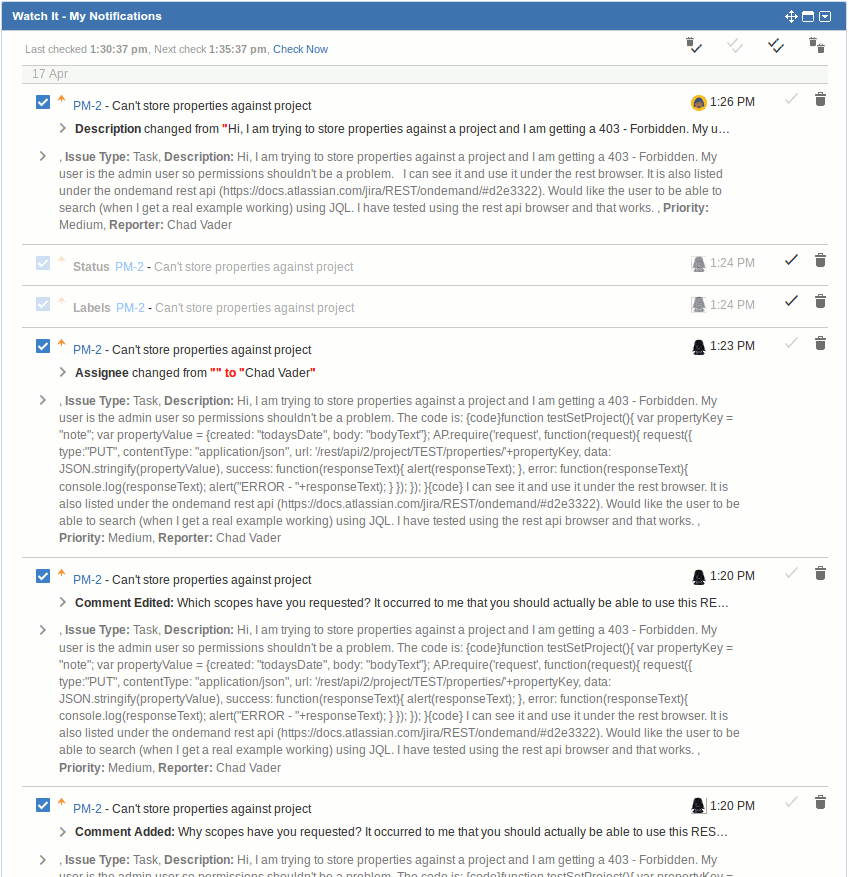
Watch It turns that on its head. Administrators (or any user with permission) define rules and trackers that decide who gets notified about which issues — by component, priority, issue type, custom field value, JQL query, or any combination. Notifications can fire on Jira events, on a schedule, or both, and can land in email, in-Jira, dashboard gadgets, or external systems via webhooks (Slack, Microsoft Teams, custom dashboards).
Watch It has been on the Atlassian Marketplace for over a decade, runs on both Jira Cloud and Data Center, and works with every Jira project type — Software, Service Management, and Business / Work Management.
Key features
- Project Trackers. Configure a tracker per project. Pick the Jira events it watches (issue created, comment added, status changed, etc.) and the criteria that narrow it down (components, priorities, JQL, current user, custom field values). The tracker fires only when both an event and the criteria match.
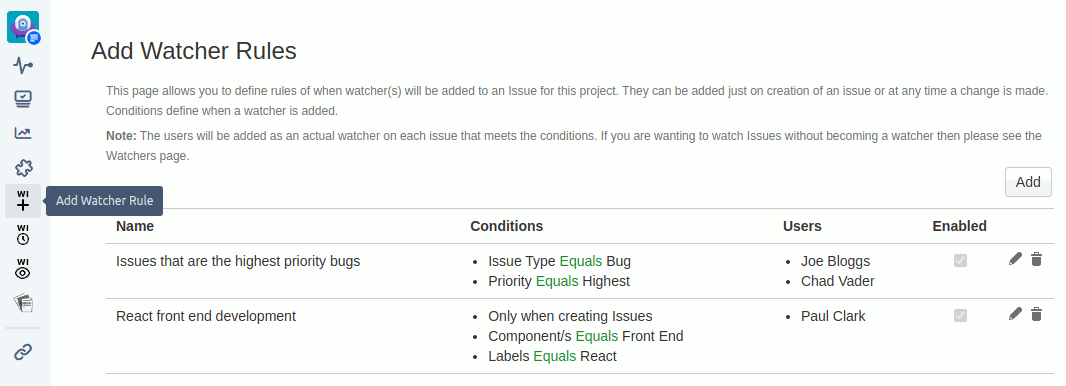
- Add Watcher Rules. Auto-subscribe users to whole classes of issues. When an issue matches the rule’s criteria — at creation or on modification — the configured users are added as Jira watchers. They then get Jira’s normal notifications without anyone having to manually subscribe.
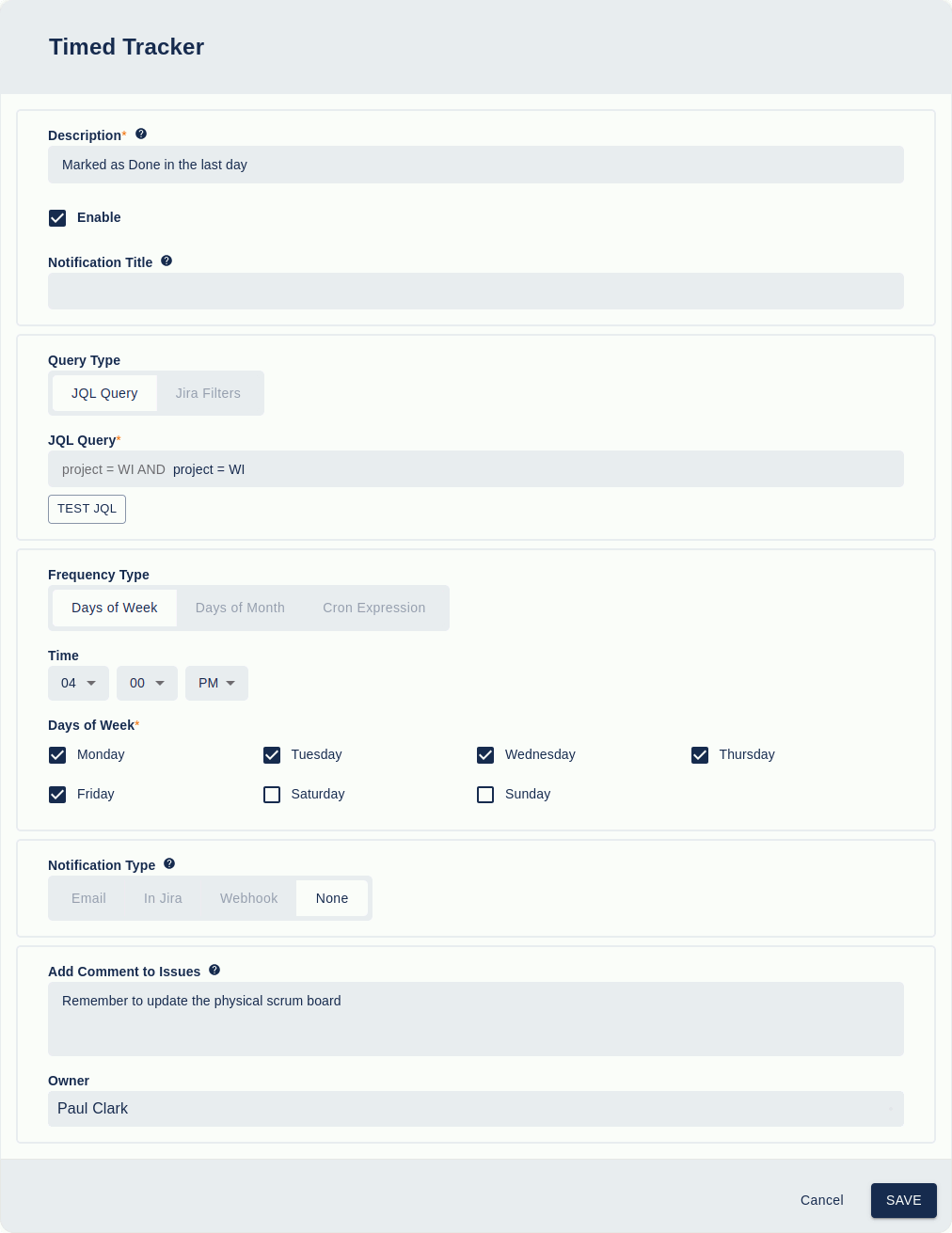
- Timed Trackers. Run a JQL query on a schedule (hourly, daily, weekly, monthly, or custom cron). Matching issues are emailed to the recipients you specify. Use it for “remind assignees of overdue bugs daily” or “email weekly summaries of unresolved critical incidents”.
- Watch It Watchers field. A custom field on the Create Issue screen that lets users add additional watchers at the moment an issue is filed — without leaving the create dialog.
- Multiple notification channels. Each tracker can route to one or more of: email, in-Jira notifications, dashboard gadgets, Slack / Microsoft Teams / custom webhooks. Restrict external emails to specific senders or domain allow-lists when sensitive data is in play.
- Batching. Optionally consolidate multiple notifications generated within a time window into a single email. Configurable per tracker, per project, or globally — kills the “100 emails for one workflow run” problem.
- Project + global scope. Trackers and rules can be defined per-project (only fires for that project) or globally (applies across many projects). One global rule can drive consistent notifications across an entire portfolio.
What teams use Watch It for
- Incident response. A Tracker watches for
priority = Highest AND created > -1hand posts to a Slack channel via webhook. The on-call team sees every new critical incident the moment it’s logged. - Customer support escalation. Add Watcher Rules subscribe the account manager whenever a JSM ticket from a strategic customer hits a particular SLA threshold or status.
- Regulated change tracking. Compliance officers are auto-watched on any issue moving through a controlled workflow, so the audit trail is complete without manual intervention.
- Executive summaries. A Timed Tracker runs
status = Open AND priority in (Highest, High)every Monday at 9 AM and emails the result to leadership — a weekly status report with zero manual work. - Cross-team handoffs. When an issue is assigned to a team or moves into a specific status, the receiving team is auto-watched so they aren’t surprised when work lands on their plate.
- Project portfolio health. Programme managers use Timed Trackers to get daily emails of issues that have been in a status for too long, surfacing blockers without polling Jira.
- JSM SLA breach prevention. A Timed Tracker runs every hour finding tickets approaching SLA breach and routes them to a Teams channel for triage.
Why customers choose Watch It
- Notification logic where it belongs — in the tool, not in inboxes. Users stop subscribing to firehose mail filters and start receiving only what matches the rules administrators define.
- JQL is the language. If you can express the criteria as JQL, Watch It can use it. No new query language, no proprietary builder to learn.
- Slack and Teams without a separate integration app. Most teams already have Slack or Teams incoming webhooks. Watch It’s webhook notifications point at those URLs and you’re done — no extra app subscription needed.
- Schedule and event together. Most tools force a choice — fire on events or poll on a schedule. Watch It does both, often combined with the same JQL.
- Batching defeats notification fatigue. A workflow that touches 30 issues no longer produces 30 emails to every watcher. Configure batching once and the noise drops by an order of magnitude.
- Decade of refinement. Most differentiators (timed trackers, webhooks, dashboard gadgets, batching, project + global rules) were customer requests over the years.
- Cloud + Data Center, same product. Migrate between editions without rebuilding the notification setup from scratch.
How Watch It compares
| Capability | Watch It | Jira native watchers | Jira Automation | Custom dashboard apps |
|---|---|---|---|---|
| Auto-subscribe by JQL or field criteria | ✓ | ✗ | Partial | ✗ |
| Scheduled / timed notifications (JQL) | ✓ | ✗ | Partial (cron) | ✓ |
| Slack / Teams / webhook outputs | ✓ | ✗ | ✓ | Often app-specific |
| In-Jira notification + dashboard gadget | ✓ | Partial | — | ✓ |
| Batching multiple events into one email | ✓ | ✗ | ✗ | Varies |
| Per-project + global scope | ✓ | Per-issue only | ✓ | Varies |
| Watcher field on Create Issue screen | ✓ | ✗ | ✗ | ✗ |
| No code required | ✓ | ✓ | ✓ | Varies |
Rule of thumb. Jira’s native watchers are fine if your team is small and disciplined about subscribing. As soon as you need systematic notification rules — “everyone in this group should be watched on every critical incident in any of these projects” — Watch It is the right tool.
Free trial and pricing
Watch It has a free trial on the Atlassian Marketplace for both Cloud and Data Center. Pricing is set by Atlassian and tiers by Jira user count — see the live tier table on the Marketplace listing.
Security and where your data lives
Watch It for Jira Data Center installs into your Jira instance and keeps all data there — no third-party servers in the data path. Watch It for Jira Cloud is a Forge app: today it runs a Forge frontend with a Redmoon-controlled backend over HTTPS + OAuth, with a planned migration to fully Forge-native storage and processing. Full details are in the Cloud Security Statement.
See also
- In-depth user guide — Watch It user guide
- Detailed feature list — Watch It Features
- Customer use cases — Watch It Use Cases
- Reviews — Watch It Reviews
- Sales pitch for stakeholders — Convince my Boss
- Migrating — Watch It Migration guide
- Marketplace listing — Watch It on the Atlassian Marketplace
Book a demo
Want a walkthrough of Watch It tailored to your team’s workflow? Get in touch via the Contact Us page and we’ll set up a live demo.