

















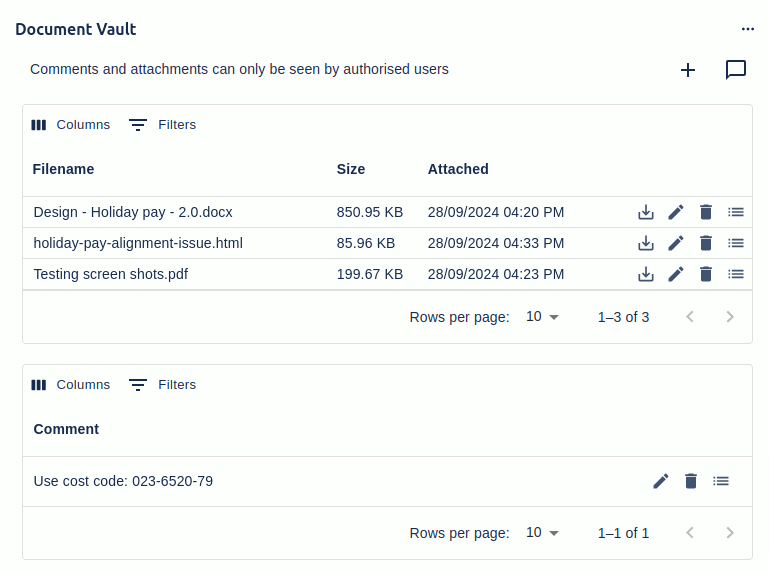
What Document Vault does
Jira’s built-in attachments treat every file as equally visible. If you can see the issue, you can see every attachment on it. There’s no concept of “this file is only for the legal team” or “only the assignee can download this contract”.
That’s fine for code screenshots and bug logs. It’s a problem for signed contracts, HR documents, financial records, customer PII, regulated evidence, or anything where the issue is broadly visible but the attachment isn’t supposed to be.
Document Vault adds a secondary attachment panel to every Jira issue with its own access control. Permitted users see and use the Vault panel; everyone else sees nothing — not even file names. It runs on both Jira Cloud (fully Forge-native, all data inside your Atlassian Cloud site) and Jira Data Center.
Key features
- Per-Vault access list. Configure access by user groups, project roles, single or multi-user custom fields, single or multi-group custom fields, or the issue’s Reporter, Assignee, or Creator. Users outside the list see nothing.
- Full + read-only access tiers. Two separate access lists — one for full access (view, upload, edit, delete) and one for read-only access (view and download). Useful for “engineering can upload; auditors can read”.
- File upload, download, update. Standard attachment operations within the Vault. Updating an existing Vault attachment replaces the file in place while keeping its metadata and comment history.
- Vault comments. Each attachment can have its own comment thread, separate from the issue’s normal comments. Standalone Vault comments (no file) are also supported — useful for sensitive notes that shouldn’t appear on the main comment thread.
- Disable / replace native Jira attachments. Two admin modes let you stop new native attachments while keeping existing ones visible, or hide all existing native attachments behind the Vault. Use these to migrate sensitive content into the Vault progressively.
- Workflow validator (DC). A transition validator that prevents a workflow transition unless at least one Document Vault attachment is present. Enforces evidence requirements at the workflow level.
- JSM + Agile support. Service Desk customer/agent visibility model is respected. Agile board cards show a Document Vault icon when an issue has Vault attachments.
- Audit + tools (DC). A global Tools tab exports attachment metadata as JSON, archives a project’s attachments to a separate directory, or deletes all Vault files for a project. A 30-day audit report shows who accessed which files.
- Project Vault Documents tab. A per-project search page that lists every Vault attachment in the project (visible to the user) — useful for cross-issue document discovery without trawling individual tickets.
- 50 MB per-file limit (Cloud). Matches Atlassian’s Forge platform constraint. Multi-file upload is supported with a shared comment applied to the batch.
What teams use Document Vault for
- Legal contracts and signed agreements. Issues track the deal lifecycle; the actual signed PDFs live in the Vault and are visible only to Legal, with the rest of the project seeing only the issue.
- HR cases. Disciplinary records, performance documents, contract amendments — visible to HR + the affected manager, hidden from the rest of the project team who can still see the case-tracking issue.
- Financial records. Invoices, statements, audit evidence on a finance-tracking issue — restricted to the finance team.
- Customer PII / KYC documentation. A customer-onboarding issue is visible to the whole support team; the customer’s ID documents are visible only to the compliance group.
- Regulated evidence (medical, government). Clinical study records, citizen documents, or other regulated content sit behind Vault access controls inside Jira rather than in a separate document system.
- Vendor / supplier documents. NDAs, supplier agreements, audit reports — accessible to procurement + the relevant manager, restricted from everyone else.
- Workflow-enforced evidence. A transition to “Ready for Release” requires a signed sign-off PDF in the Vault. The validator blocks the transition until evidence is present.
- Standalone confidential notes. A Vault comment with no file lets a manager record privileged context on a publicly-visible issue.
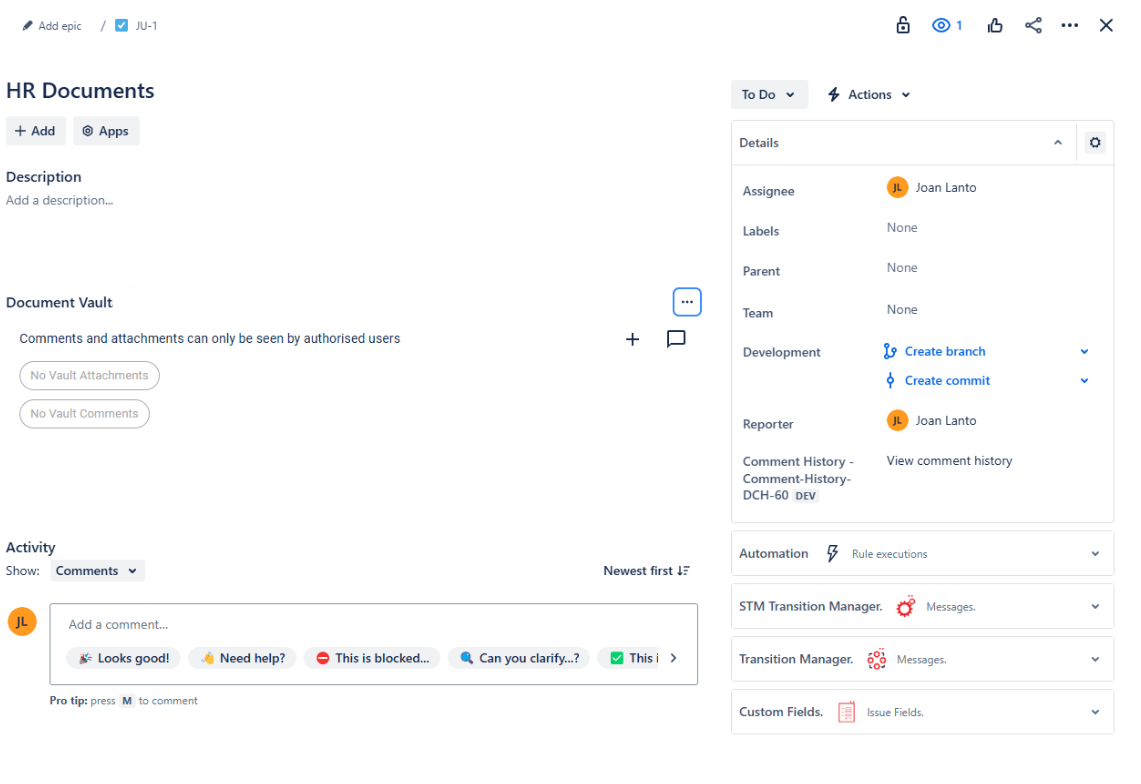
Why customers choose Document Vault
- Access control where Jira has none. Per-attachment security isn’t in Jira. Document Vault fills the gap without forcing per-issue restrictions on the whole ticket.
- Invisible if you don’t have access. Users outside the access list don’t even see file names. Nothing leaks via name disclosure.
- Two-tier access. Full and read-only access lists together cover the common “this group works with it, that group needs to be able to read it” pattern.
- Replaces native attachments where needed. The two attachment modes mean you can adopt Document Vault progressively — for a project, then a department, then all sensitive workflows.
- Workflow-enforced (DC). The transition validator turns Vault attachments from a convention into a policy that workflows actually enforce.
- Audit-ready (DC). A 30-day access report and project-level export tools mean compliance reviews don’t require dredging Jira logs by hand.
- Data stays in Jira (both editions). Cloud is Forge-native so files live in Atlassian’s storage; Data Center stores files alongside the rest of your Jira attachments. No third-party servers in either edition.
- Decade of refinement. Document Vault has the strongest review ratings in the Redmoon portfolio (5.0/5) and most differentiators came from regulated-industry customer requests.
How Document Vault compares
| Capability | Document Vault | Native Jira attachments | Per-issue security | External document store |
|---|---|---|---|---|
| Per-attachment access control | ✓ | ✗ | ✗ (per-issue only) | ✓ (separate system) |
| Files invisible if no access (name + content) | ✓ | ✗ | n/a | ✓ |
| Read-only access tier | ✓ | ✗ | ✗ | Varies |
| Inside the issue UI (no context switch) | ✓ | ✓ | ✓ | ✗ |
| Workflow validator (evidence required) | ✓ (DC) | ✗ | ✗ | ✗ |
| Custom field / role / reporter / assignee scoping | ✓ | ✗ | Limited | n/a |
| Audit access report | ✓ (DC) | ✗ | Limited | Varies |
| Data inside your Jira / Atlassian Cloud | ✓ | ✓ | ✓ | ✗ |
Rule of thumb. Anywhere a Jira issue is broadly visible but its attachments shouldn’t be — Document Vault is the right tool. Per-issue security can restrict the whole ticket but is heavy-handed; an external document system fragments your workflow. Document Vault sits exactly where the gap is.
Free trial and pricing
Document Vault has a free trial on the Atlassian Marketplace for both Cloud and Data Center. Pricing is set by Atlassian and tiers by Jira user count — see the live tier table on the Marketplace listing.
Security and where your data lives
Document Vault for Jira Data Center stores all files and metadata inside your Jira instance — no third-party servers in the data path. Document Vault for Jira Cloud is a fully Forge-native app: files and metadata live inside your Atlassian Cloud site via Forge storage. Files never leave the Atlassian / your-DC boundary in either edition. Full details are in the Cloud Security Statement.
See also
- Cloud user guide — Document Vault for Jira Cloud
- Data Center user guide — Document Vault for Jira Data Center
- Detailed feature list — Document Vault Features
- Limitations — Document Vault Limitations
- Customer use cases — Use Cases · Cloud Use Cases
- Reviews — Reviews (Cloud) · Reviews (DC)
- Sales pitch for stakeholders — Convince my Boss
- Migration guide — Document Vault Migration
- Securing project files walkthrough — Securing Your Project Files
- Partners — Document Vault Partners
- Marketplace listing — Document Vault on the Atlassian Marketplace
Book a demo
Want a walkthrough of Document Vault tailored to your team’s compliance or document-handling scenario? Get in touch via the Contact Us page and we’ll set up a live demo.