

















What STM does
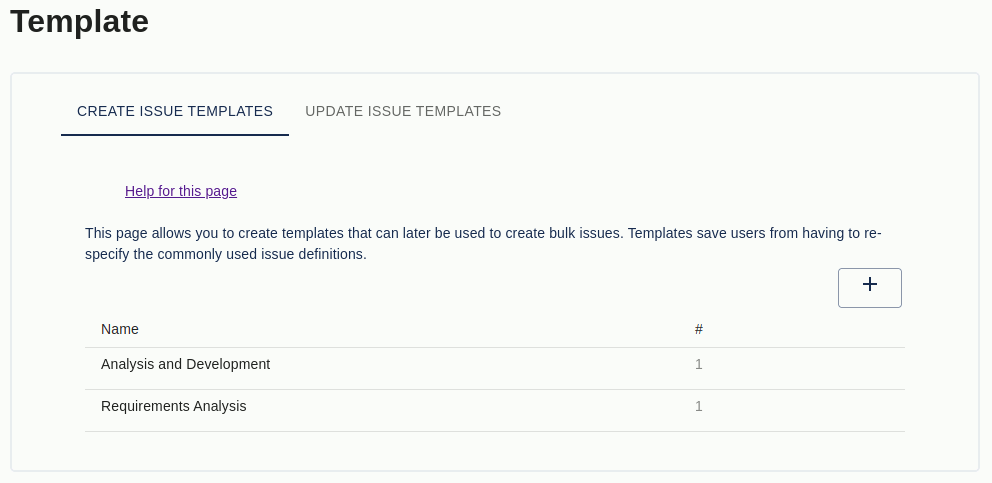
Jira does not ship with a built-in issue-template feature. You can clone a single issue, but you cannot save a reusable template, automatically create structured sub-task hierarchies, or trigger issue creation when an issue moves through a workflow.
STM Issue Templates fills that gap. It is the long-running Atlassian Marketplace plugin (on Marketplace since 2014, 4.6/5 from 20+ reviews) that adds true template-based issue creation to Jira — on both Cloud and Data Center, across every Jira project type (Software, Service Management, and Business / Work Management).
Real-world STM customers run templates with a large number of issue definitions in production. That scale is impractical in any of the alternative tools.
Key features
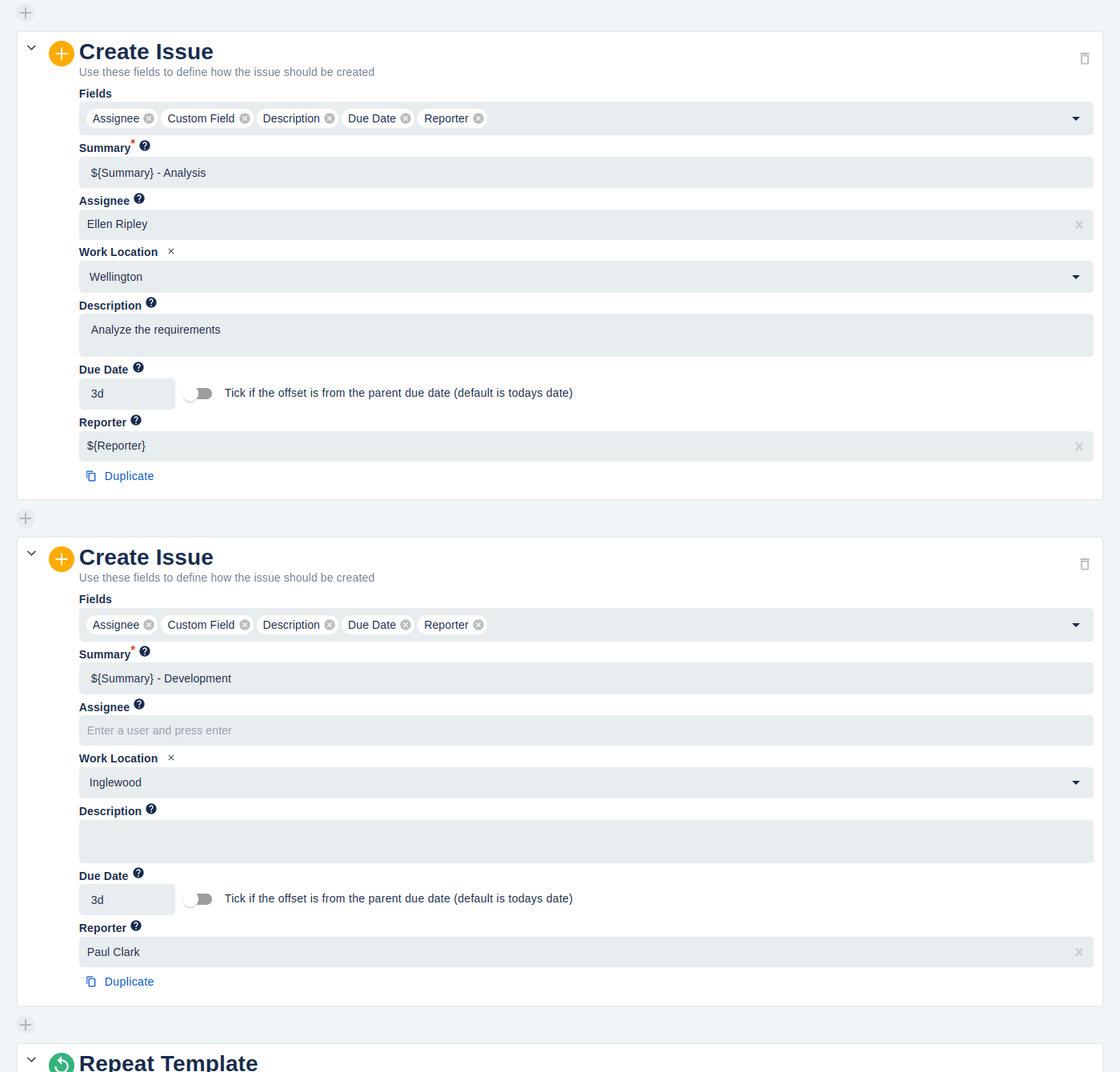
- Templates for every issue relationship. Create sub-tasks, linked issues, epic issues, or unconnected issues from a single saved template. Each template can produce one or many issues with consistent fields, assignees, watchers, and descriptions.
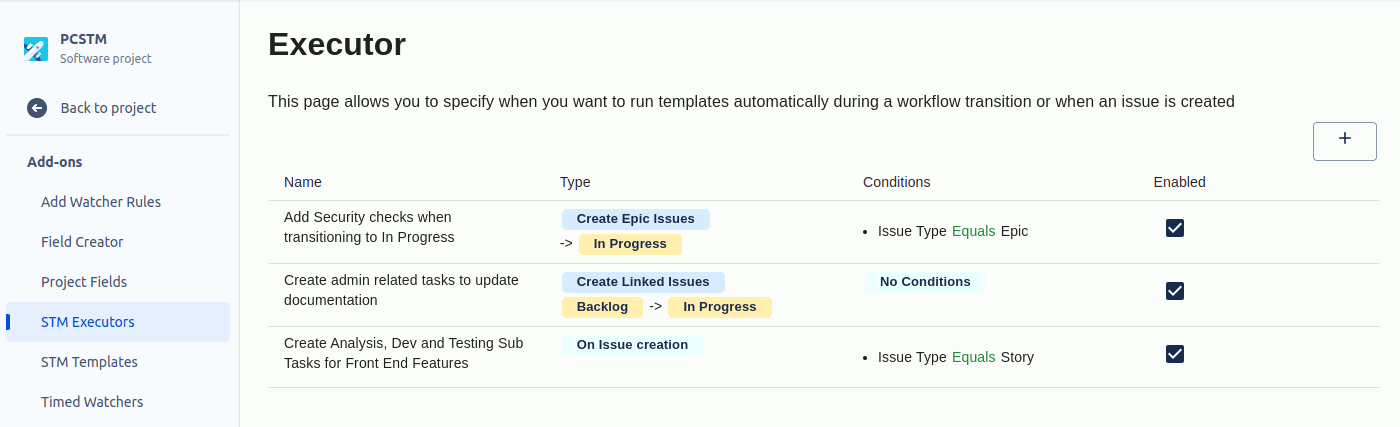
- Automatic firing with executors. Executors trigger a template when an issue is created, transitions between statuses, or has a field value change. Conditions narrow when an executor actually fires; actions specify what it does.
- Cascading templates. One template runs other templates against each issue it creates, so you can build epic → story → sub-task hierarchies from a single trigger.
- Update templates. Don’t just create new issues — modify existing ones. Update Templates change field values, watchers, and comments on issues already in the system, on the same trigger model as create templates.
- JQL bulk-create and bulk-update. Apply a template to every issue matching a JQL query in one operation. Use an existing template, a modified copy, or define one inline.
- Cross-project orchestration. A template’s Create Issue section can target a different project than the trigger issue — including across project categories. A JSM ticket can spawn engineering work; a release ticket can create QA + docs sub-issues in their respective projects.
- Project + global scope. Templates and executors can be project-scoped (only used inside one project) or global (available to many projects or all projects).
- Repeating templates. Run a template once per component or fix version on the parent issue, without writing a loop.
- Field-reference syntax. Templates can reference parent-issue fields like
${Summary},${Assignee}, or any custom field, so created issues reflect the context they were created from. - Per-row run history. Click the run-history icon next to any template or executor row to see exactly when it last fired and what the outcome was — the fastest path to “why didn’t this run as expected?”. A project-wide Errors tab provides the same view aggregated across every template and executor.
What teams use STM for
- Engineering — every bug ticket spawns the same triage / investigation / fix / verify sub-tasks. Every release ticket spawns QA, docs, comms, and rollback sub-issues.
- DevOps / SRE — incident tickets auto-create triage, customer-comms, and postmortem sub-issues. Deployment tickets cascade into environment-specific sub-tasks.
- Product — epic creation triggers a cascading template that scaffolds discovery, design, dev, QA, and launch story sub-issues.
- Jira Service Management — every change request fires a standard set of CAB-review, implementation, and post-implementation review sub-tasks. Customer-support escalations spawn engineering investigation tickets in another project.
- Compliance / regulated teams — audit and decision records are created from templates with mandatory fields, so the structure is consistent across the team and trivially auditable.
- Customer success — onboarding tickets cascade into a 30/60/90-day plan of follow-up tasks.
Need ready-made examples? The Jira Issue Templates library has 20+ copy-and-paste templates covering most of these patterns — bug reports, release notes, RFCs, postmortems, deployment checklists, sprint retros, change requests, and more.
Why customers choose STM
- No-code. Project admins configure templates through the UI. There’s no Groovy file to read, no scripting team dependency, no engineering ticket to file in order to change a template.
- Scales without falling over. Customers run templates with a large number of issues and global executors driving automation across dozens of projects. STM was built for this scale, not retrofitted.
- Templates are first-class artefacts. They live on a dedicated page, can be exported and imported, and can be moved between projects. They behave like real configuration, not lines of code or rule-builder canvases.
- Works with every Jira project type. Software, Service Management, and Business — same plugin, same features.
- Cloud and Data Center. Whichever Jira edition you’re on now (or migrate to later), STM is there. The Import/Export page makes the DC → Cloud move straightforward when you do migrate.
- Decade of refinement. STM has been on the Marketplace since 2014. The feature set was shaped by years of customer feedback — most of the differentiators (executors, cascading, JQL bulk-update, update templates) were customer requests that became core capabilities.
- Responsive support. Backed by Redmoon Software’s dedicated support team. The Reviews page is consistently strong on responsiveness — see STM reviews.
How STM compares
| Capability | STM | Jira Automation | ScriptRunner | Easy Issue Templates |
|---|---|---|---|---|
| Templates as first-class declarative objects | ✓ | Partial | Code only | ✓ |
| Templates with a large number of issue definitions | ✓ | Unmaintainable | Hard to maintain | ✓ |
| Cascading template hierarchies | ✓ | — | Code only | Limited |
| Auto-fire on create / transition / field change | ✓ | ✓ | ✓ | Limited |
| Update existing issues from a template | ✓ | ✓ | ✓ | Limited |
| JQL bulk-create / bulk-update | ✓ | — | Code only | — |
| Repeating templates (per component / fix version) | ✓ | — | Code only | — |
| Cross-project + cross-category creation | ✓ | ✓ | ✓ | ✓ |
| No code / no Groovy required | ✓ | ✓ | ✗ | ✓ |
| Cloud + Data Center editions | ✓ | ✓ | ✓ | ✓ |
For a longer, prose comparison of STM versus each tool, see the STM vs other Jira template options section of the user guide.
A short rule of thumb: if a single create rule with fewer than five issues is enough, Atlassian’s built-in Automation may do the job. If your template grows beyond that — or you need hierarchies, JQL bulk-operations, transition orchestration, or update templates — STM is the tool built for it. ScriptRunner is a complement, not a substitute: many teams run both for different jobs.
Free trial and pricing
STM has a free trial on the Atlassian Marketplace for both Cloud and Data Center editions. Pricing is set by Atlassian and tiers by Jira user count — see the live tier table on the Marketplace listing.
Security and where your data lives
STM for Jira Data Center installs into your Jira instance and keeps all data there — no third-party servers in the data path. STM for Jira Cloud is a Forge app: today it runs a Forge frontend with a Redmoon-controlled backend over HTTPS + OAuth, with a planned migration to fully Forge-native storage and processing. Full details are in the Cloud Security Statement.
See also
- In-depth user guide — STM Issue Templates user guide (every feature documented, with screenshots).
- Detailed feature list — STM Features.
- Limitations — STM Limitations (what STM can’t do, so there are no surprises).
- Customer use cases — STM Use Cases.
- Reviews — STM Reviews (Marketplace reviews, filtered for substance).
- Walkthrough — Adding a Template — step-by-step.
- Sales pitch for stakeholders — Convince my Boss.
- Migrating from Data Center to Cloud — STM Migration guide.
- Ready-made templates — Jira Issue Templates library.
- Marketplace listing — STM on the Atlassian Marketplace.
Book a demo
Want a walkthrough of STM tailored to your team’s workflow? Get in touch via the Contact Us page and we’ll set up a live demo.