

















What Comment History does
Jira treats issue comments as throwaway. Edit a comment and the previous version is gone. Delete a comment and it’s gone for good. There is no list anywhere in Jira showing “every change to every comment on this issue”.
In most teams that’s fine. In regulated industries, in legal disputes, in post-incident reviews, and in anything that touches money or compliance, it’s a serious gap. Someone editing or deleting context — accidentally or maliciously — leaves no trail.
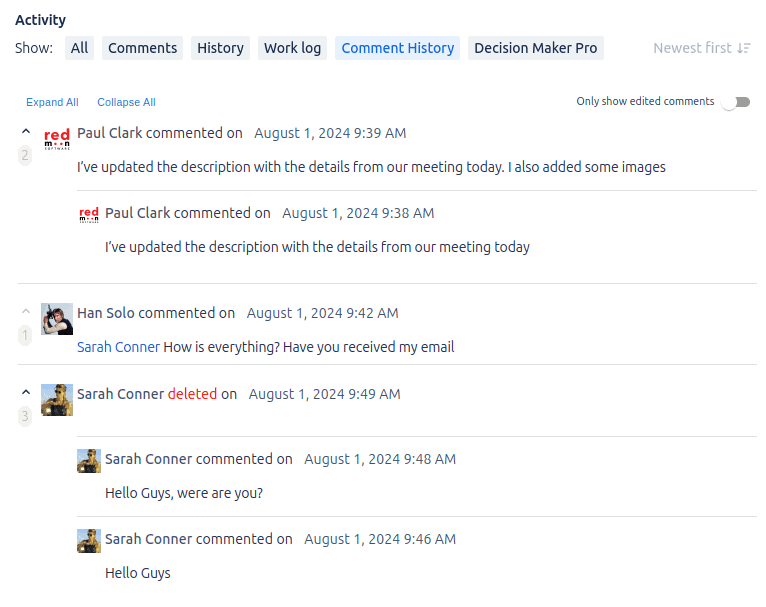
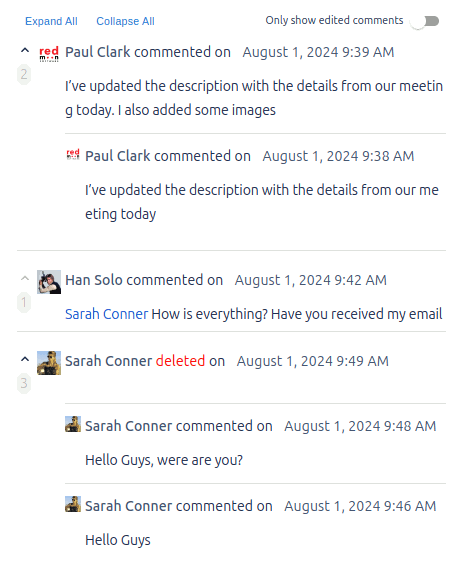
Comment History captures every edit and deletion automatically the moment it’s installed. Every issue gains a Comment History tab. Every comment carries its full chronological history. Deleted comments are kept with a clear “deleted” marker so you can see both that a comment was removed and what it said. Visibility restrictions are respected throughout — a comment that was restricted to a group stays restricted in its history view.
Comment History is available for both Jira Cloud (Forge-native) and Jira Data Center.
Key features
- Per-issue Comment History tab. Every issue gets a new tab listing every comment alongside its full edit and deletion timeline, ordered chronologically.
- Per-comment history popup. A clock-with-arrow icon next to each comment opens a popup with that comment’s complete version history, author, and timestamps.
- Side panel (Cloud). A right-hand sidebar shows the same edit and deletion history side-by-side with the issue details, so you can skim history without leaving the main issue view.
- Deleted comment recovery. Deleted comments stay in the history with a red “deleted” marker, and any prior versions are still listed in full. Recover content that was removed accidentally or maliciously.
- Visibility-aware. Comment History respects Jira’s existing comment-security rules. The plugin records the visibility level at the moment each comment is created, updated, or deleted, and only shows history entries to users allowed to see the underlying comment.
- Last Comment custom fields (Data Center). Two custom fields,
LastUpdatedCommentandLastCreatedComment, are auto-created. JQL likeLastUpdatedComment ~ "Closed"lets you search by recent comment text — the first 255 characters of each. - Show Last Comment on issue panel (Data Center). Enable a setting that surfaces the latest comment directly in the issue’s detail section, so reviewers don’t have to scroll to the bottom of long comment threads.
- REST API token (Data Center). A configuration-page-generated token grants programmatic access to comment history data, for integration with compliance reporting systems.
- Zero configuration to start. Install the app and it begins capturing on every comment immediately. No re-index required.
What teams use Comment History for
- Regulated industries (finance, healthcare, government). Comment History is the audit log that demonstrates “we know who changed what, when, and what the original said”. Required for many compliance regimes.
- Legal / dispute resolution. When the question is “what was originally said before someone edited it”, Comment History has the answer. Without it, the original is lost.
- Post-incident reviews. Engineering retrospectives often hinge on who said what during the incident. Edits and deletions during the heat of the moment are preserved.
- Customer support (JSM). When customer interactions get edited (deliberately or by mistake), Comment History keeps the full conversation including any walked-back statements.
- Sensitive issue handling. HR cases, security incidents, and other restricted-issue workflows benefit from a permanent record that respects the same visibility rules as the comments themselves.
- Accidental deletion recovery. Someone hit “delete comment” by mistake on a long, important comment? Open the history view, copy the content back.
- Vendor / contractor accountability. When external collaborators have comment access, knowing whether a critical detail was added then quietly removed matters.
Why customers choose Comment History
- Audit-grade out of the box. No setup, no migration, no re-index. Install it and start capturing.
- Respects existing security. Doesn’t bypass Jira’s comment visibility — restricted comments stay restricted in history.
- Data stays in Jira. Both editions keep all data inside your Jira instance. Cloud uses Forge storage (data lives in your Atlassian Cloud site); Data Center uses the Jira database. No third-party servers.
- Recovers what Jira loses. Edits and deletions stop being destructive.
- Custom field + JQL search (Data Center). The
LastUpdatedCommentandLastCreatedCommentcustom fields make recent comment text queryable from anywhere JQL works. - Lightweight. No measurable performance impact. The plugin records changes as they happen rather than scanning afterwards.
- Decade of refinement. Comment History has been on the Marketplace since the early days of the Jira plugin ecosystem.
How Comment History compares
| Capability | Comment History | Native Jira | Slack / Teams archive |
|---|---|---|---|
| Full per-comment edit history | ✓ | Latest version only | n/a |
| Recoverable deleted comments | ✓ | Lost | n/a |
| Respects Jira comment visibility | ✓ | n/a | ✗ |
| In-product UI (per-issue tab) | ✓ | ✗ | ✗ |
| JQL search of recent comment text | ✓ (DC) | ✗ | ✗ |
| Data stays in Jira / Atlassian Cloud | ✓ | ✓ | ✗ (data in Slack/MS) |
| No re-index or setup required | ✓ | n/a | n/a |
Rule of thumb. If you ever need to answer the question “what was originally in that comment before it was edited or deleted, and who changed it?” — Jira alone can’t answer. Comment History can.
Free trial and pricing
Comment History has a free trial on the Atlassian Marketplace for both Cloud and Data Center. Pricing is set by Atlassian and tiers by Jira user count — see the live tier table on the Marketplace listing.
Security and where your data lives
Comment History for Jira Data Center stores all data inside your Jira database — no third-party servers in the data path. Comment History for Jira Cloud is a fully Forge-native app: data lives inside your Atlassian Cloud site via Forge storage. Comment content never leaves the Atlassian / your-DC boundary in either edition. Full details are in the Cloud Security Statement.
See also
- Cloud user guide — Comment History for Jira Cloud
- Data Center user guide — Comment History for Jira Data Center
- Customer use cases — Use cases (Cloud) · Use cases (DC)
- Reviews — Reviews (Cloud) · Reviews (DC)
- Migration guides — Migration (Cloud) · Migration (DC)
- Marketplace listing — Comment History on the Atlassian Marketplace
Book a demo
Want a walkthrough of Comment History tailored to your audit or compliance scenario? Get in touch via the Contact Us page and we’ll set up a live demo.