

















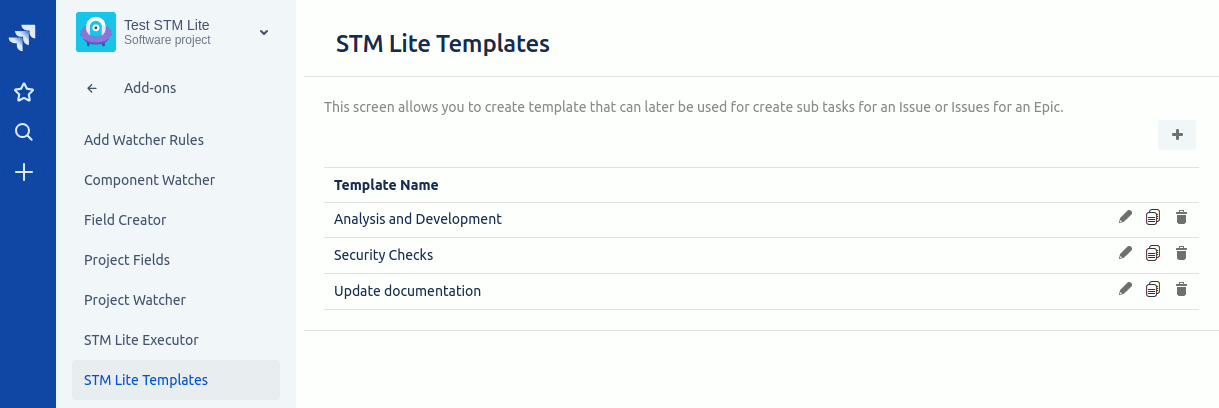
What STM Lite does
Jira has no built-in issue-template feature. Many teams don’t need the full power of STM Issue Templates — they just want a simple, project-level way to bulk-create the same set of sub-tasks (or linked issues or epics) from an existing issue, manually or on a trigger.
STM Lite is exactly that: the streamlined, project-scoped version of STM. Define a template per project, apply it manually from any issue, or set up an Executor that fires it automatically when an issue is created or transitions. Cheaper, simpler, easier to adopt — without the global / cascading / JQL-bulk capabilities of full STM that smaller teams don’t need.
Comparison helper: if you find yourself wanting global templates, cascading hierarchies, or JQL-driven bulk operations, you should be running STM Issue Templates instead of STM Lite. See How STM Lite compares to STM below.
Key features
- Project-level templates. Each project has its own templates, managed by project admins. No global / cross-project sharing.
- Three issue relationships. A template can create sub-tasks, linked issues, or epic issues against a parent issue.
- Manual application. Select a template from the issue’s add-on menu and STM Lite creates the configured set of sub-tasks / linked / epic issues against that parent.
- Automatic via Executors. An Executor specifies that the template should fire on issue creation or on a workflow transition. Optional criteria (issue type or current user) narrow when the executor runs.
- Field references. Template fields support
${Summary},${Description},${Assignee},${Reporter}, and any custom field by name.$!{...}suppresses the literal “null” when the parent field is empty. - Copy from parent. Pick parent-issue fields to copy verbatim onto every issue created by the template — useful for components, fix versions, labels, custom fields.
- Field-aware editor. The template editor honours your project’s Create Issue screen configuration. Fields not on the create screen don’t appear as template options either.
- Configurable fields per issue definition. Each issue inside a template can have a different set of fields shown.
What teams use STM Lite for
- Every bug spawns the same investigation sub-tasks. Triage → Reproduce → Fix → Verify, with assignees and descriptions filled in.
- New feature epics get a standard sub-task scaffolding. Discovery → Design → Build → Test → Launch, attached to every new epic when it’s created.
- Customer support ticket follow-up. Every JSM ticket on a transition to “Acknowledged” spawns the “send acknowledgement”, “investigate root cause”, and “follow-up call” sub-tasks.
- Release coordination. A release ticket auto-creates the QA, docs, comms, and rollback sub-tasks on creation, with the release date copied from the parent.
- Onboarding tickets. A new-employee ticket spawns the standard onboarding sub-tasks — laptop setup, account creation, mandatory training, manager check-in.
- Recurring weekly / monthly meeting prep. Manually run a template on a recurring meeting issue to create the standard prep sub-tasks each week.
Why customers choose STM Lite
- Quick to adopt. Simpler than full STM — fewer concepts (no cascading templates, no global vs project, no JQL bulk, no Update Templates). Get value within an afternoon.
- Right-sized for project-scope teams. Many teams only need a small handful of templates per project. STM Lite charges accordingly and doesn’t ask them to learn features they won’t use.
- Same template authoring style as STM. If you grow into needing STM, the template authoring concepts transfer — you’re not relearning from scratch.
- No-code. Project admins configure templates through the UI.
- Cloud-only and lightweight. Designed for Jira Cloud teams that want a simple solution without the operational footprint of a heavier plugin.
How STM Lite compares
| Capability | STM Lite | STM Issue Templates | Jira Automation |
|---|---|---|---|
| Per-project templates | ✓ | ✓ | ✓ |
| Global templates | ✗ | ✓ | ✓ |
| Sub-tasks / linked / epic issues | ✓ | ✓ | ✓ |
| Auto-fire on create / transition | ✓ | ✓ (+ on field change) | ✓ |
Field references with ${...} | ✓ | ✓ | Partial |
| Cascading templates (multi-level hierarchies) | ✗ | ✓ | ✗ |
| Update existing issues from a template | ✗ | ✓ | ✓ |
| JQL bulk-create / bulk-update | ✗ | ✓ | ✗ |
| Repeating templates (per component / fix version) | ✗ | ✓ | ✗ |
| Cross-project templates | ✗ | ✓ | ✓ |
| Best for templates with ≤ ~10 issues | ✓ | ✓ | Partial |
| Best for templates with 50+ issues | ✗ | ✓ | ✗ |
Rule of thumb. Start with STM Lite if your need is “I want a template per project that creates a small standard set of sub-tasks”. Upgrade to STM Issue Templates when you outgrow that — usually around the point you want global templates, hierarchies, or JQL operations.
Free trial and pricing
STM Lite has a free trial on the Atlassian Marketplace. Pricing is set by Atlassian and tiers by Jira user count — see the live tier table on the Marketplace listing.
Security and where your data lives
STM Lite for Jira Cloud is an Atlassian Connect app — the user interface and data live on Redmoon’s servers, with OAuth-based authentication back into your Jira Cloud instance. All traffic is HTTPS. This is an older Atlassian architecture than Forge but is fully supported by Atlassian. Full details are in the Cloud Security Statement.
See also
- In-depth user guide — STM Lite user guide
- The full version — STM Issue Templates overview
- Marketplace listing — STM Lite on the Atlassian Marketplace
Book a demo
Want a walkthrough of STM Lite tailored to your team’s workflow? Get in touch via the Contact Us page and we’ll set up a live demo.