

















What Comment Security Default does
In native Jira, the comment-security drop-down defaults to “Viewable by all users”. Every time someone writes a comment, they have to remember to change that drop-down if the comment is sensitive. If they forget — and people do forget — the comment is public to everyone with issue access.
That’s a fail-open design. It puts the burden of getting security right on every user, on every comment, every time. For most teams that’s wrong; for regulated teams, customer-facing teams, or anything touching compliance/security/legal/HR/financial data it’s a quiet, ongoing leak.
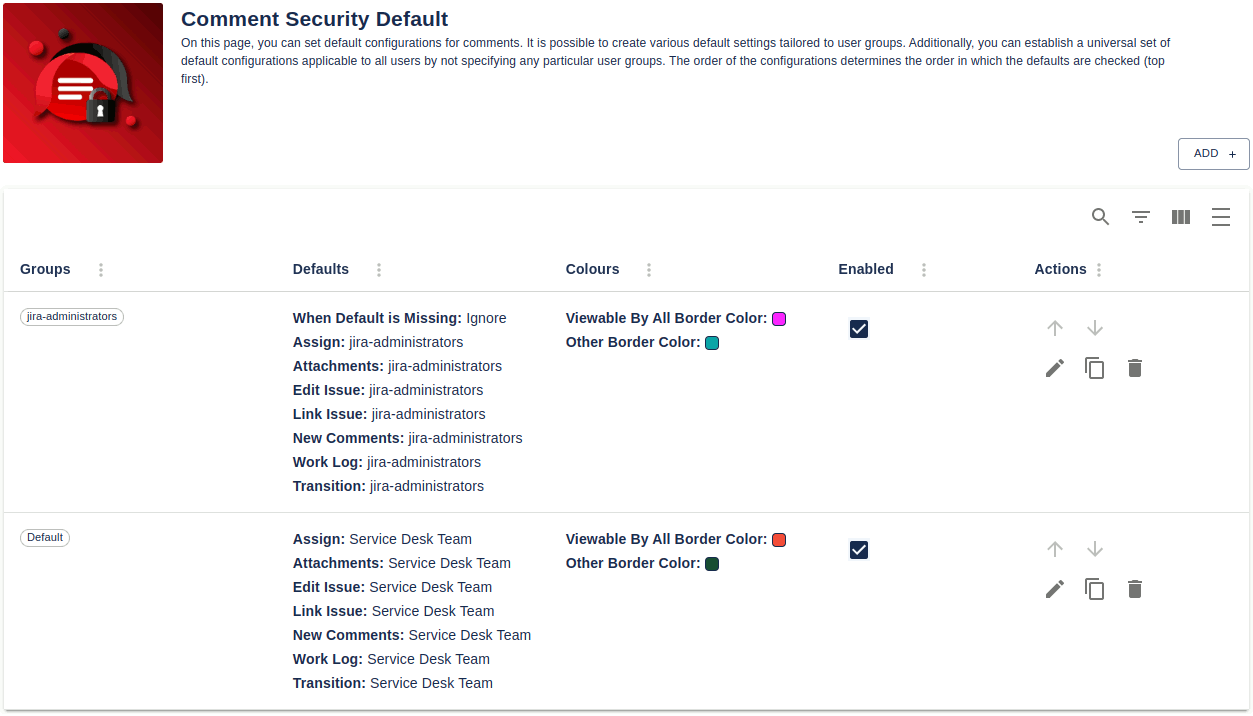
Comment Security Default flips it to fail-closed. A Jira administrator configures the safe default and that default is applied automatically. Users have to actively make a comment more visible, not less. The most common configuration mistake (forgetting to restrict) becomes impossible.
A Cloud Forge-native version is available. This works a little differently than the data center version. Check out its details at: Comment Security Default for Jira cloud.
Key features
- Default security level for everything. New comments in issues and comments in the assignee, attachments, edit issue, link issue, work logs, and workflow transitions dialogs all get a configurable default visibility.
- By group, by role. Configurations can set deaults for Jira user groups or project roles. This can be defined in project or global configurations. In those configurations, visibility can be set for users in particular groups or as a default for those not in the defined groups. The app walks the configurations in order and applies the first match.
- Multiple configurations per scope. Define many configurations side-by-side — for example, “support team gets the Support user group by default; engineering team gets the engineering project role by default; everyone else gets viewable to all by default”.
- Global + project-level scope. Project configurations override global ones for that project. Use global config for sitewide policy plus per-project overrides where teams need different defaults.
- JSM support / Service Desk. Always show the Customer tab on JSM tickets, swap the order of Customer and Internal tabs, rename the comment author shown to customers, or fall back to standard Jira comment fields instead of customer/internal tabs.
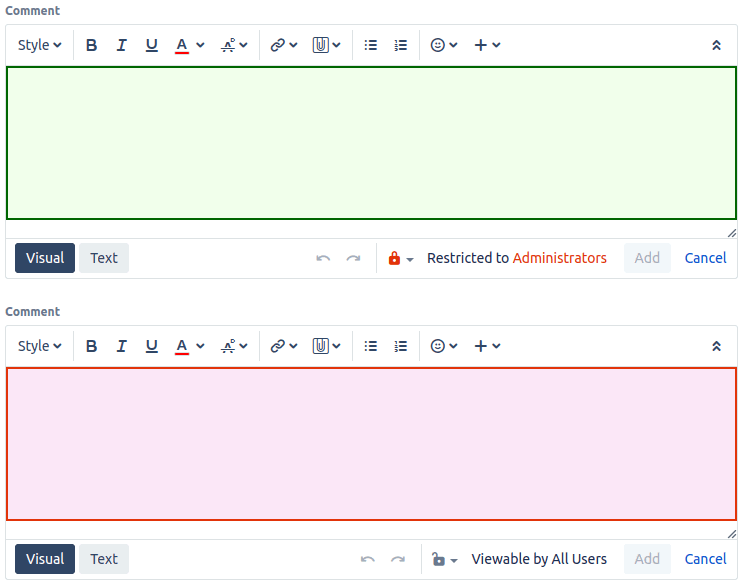
- Color-coded comment fields. Highlight comment input fields with custom background and border colours depending on whether the comment will be public or restricted. The user sees, before clicking Save, whether the comment is public or has a restriction on it.
- Per-transition defaults. Set a different default at each workflow transition — for example, “comments added during the Review transition default to Reviewers-only”.
- Works on JSM/Service Desk and Jira Agile. Full support for both, plus standard Jira Software, Business, and Service Management projects.
What teams use Comment Security Default for
- Regulated industries (finance, healthcare, government). Default comment visibility for compliance/security/clinical/financial/legal context defaults to a restricted group. Users have to actively choose to make something visible to a wider audience — and that choice is now an explicit decision rather than an oversight.
- JSM customer-facing teams. Comments default to restricted user group or project role comments so engineers don’t accidentally post raw debug output where the customer can see it. The Customer tab is always visible so customer-facing replies are still one click away.
- Legal and HR. Sensitive case notes default to a small group; “share with the wider team” is an explicit, deliberate action.
- Multi-tenant / MSP environments. Configurations per project mean Customer A’s comments default to Customer A’s group, and Customer B’s project has its own default — no cross-tenant comment exposure.
- External contractors / vendors. Whichever projects external collaborators have access to, default the comment visibility to “internal team” so the default direction is “keep this in” rather than “let it out”.
- Workflow review steps. Comments added during a Review or Approval transition default to the reviewer group, not to all users — preventing draft review notes from being visible before the decision is final.
Why customers choose Comment Security Default
- Fail-closed instead of fail-open. The single largest source of accidental information disclosure in Jira (forgetting to restrict a comment) becomes structurally impossible.
- No retraining required. Users don’t change how they work — the right default just happens. Behaviour change is on the configuration side, not on every team member.
- Per-group or to all user. Tuned to the exact policy a team needs, not a single sitewide setting.
- Visual confirmation before save. Color-coded comment fields tell users instantly whether the comment is going to be public or restricted — before they hit Save.
- JSM-aware. JSM is fully supported. You can also use non-JSM comment fields, always show the customer tab, reverse the comment tabs or set a name to use for all internal comments in the JSM portal.
- No measurable performance impact. The app only acts at comment creation / edit / transition time.
- Long track record. On Marketplace for many years with strong reviews from regulated-industry customers.
How Comment Security Default compares
| Capability | Comment Security Default | Native Jira | Manual policy + training |
|---|---|---|---|
| Default visibility for new comments | ✓ | “Visible to all” hard-coded | n/a (relies on user memory) |
| Per-group defaults | ✓ | ✗ | n/a |
| Per-project defaults | ✓ | ✗ | n/a |
| Global defaults | ✓ | ✗ | n/a |
| Per-workflow-transition defaults | ✓ | ✗ | n/a |
| Defaults for new comments and comments in the assignee attachment, edit issue, link issue, work log and transition dialogs | ✓ | ✗ | n/a |
| Color-coded comment fields | ✓ | ✗ | n/a |
| JSM customer/internal tab handling | ✓ | Partial | n/a |
| Reduces risk of accidental disclosure | ✓ | ✗ | Partial |
Rule of thumb. Any team where the cost of an accidentally-public comment is higher than the cost of an accidentally-restricted comment should run Comment Security Default. That includes essentially every regulated, customer-facing, legal, HR, or security-conscious team.
Free trial and pricing
Comment Security Default has a free trial on the Atlassian Marketplace. Pricing is viewable on the Atlassian Marketplace and defines tiers by Jira user count — see the pricing table on the Marketplace listing.
Security and platforms
The data center version of Comment Security Default runs on the customers Jira instance, with all data stored inside that Jira instance — no third-party servers in the data path. Full details are in the Cloud Security Statement.
See also
- In-depth user guide — Comment Security Default user guide
- Reviews — Comment Security Default Reviews
- Marketplace listing — Comment Security Default on the Atlassian Marketplace
Book a demo
Want a walkthrough of Comment Security Default tailored to your team’s compliance, security or JSM needs? Get in touch via the Contact Us page and we’ll set up a live demo.