

















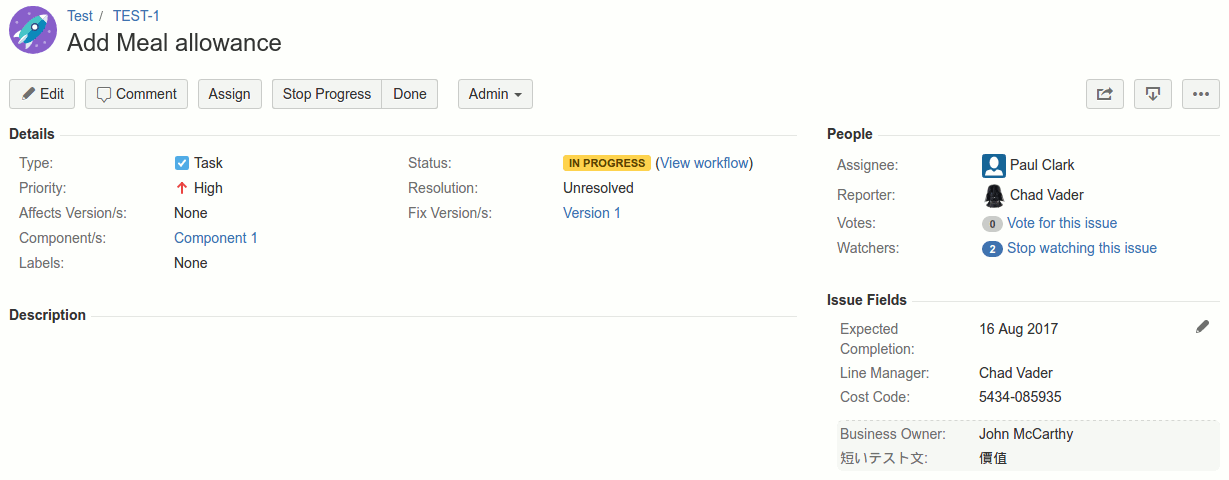
What Custom Fields does
Native Jira custom fields are useful but limited. They live at the issue level only. Creating one requires system-admin access. There’s no way to scope a field to a single project. And there’s no built-in security beyond global field-configuration schemes — a custom field that holds sensitive HR or financial data is visible to anyone who can see the issue.
Custom Fields for Jira Cloud adds the capabilities that native fields don’t have:
- Project-level fields that exist only in one project, managed by that project’s admins without going through a system-admin queue.
- Per-field security — Visible To and Editable By groups on every field, so sensitive data is restricted to authorised users.
- Reusable validators — regex, min/max, with central enable/disable. One validator can be re-used on many fields.
- List-from-project cascade type — an issue-level list whose options are filtered by what’s selected at the project level.
- JQL search — opt-in mirroring into native Jira custom fields so values are searchable from the issue navigator.
Key features
- Two scopes — global and project. Global fields apply everywhere (system-admin managed). Project fields are scoped to one project (project-admin managed) — no central admin involvement required.
- Two visibility targets — project and issue. A field can be visible at the project level (one value per project, shown on a Custom Project screen), at the issue level (one value per issue, shown on the issue screen), or both with the same value cascading from project to issue.
- Eight field types. Date, Label, List, Number, Rich Text, String, User, and List-from-Project-field — each with optional multi-select.
- Per-field security. Visible To and Editable By group lists on every field. Empty = everyone; populated = only those groups. Sensitive data (cost codes, HR info, compliance flags) is restricted without needing per-issue security.
- Validators. Date, Number, and String fields can have validators that check the value against a regex and/or min/max bounds. Validators are reusable — one validator can be attached to many fields. Disabling a validator turns it off everywhere without un-assigning it.
- Cascading lists from project values. A list-from-project field on an issue is populated from a multi-select list at the project level. Choose Red and Green on the project, and the issue field offers only Red and Green — not the full list.
- JQL search. Opt into “Use JIRA Custom Field” on any Date, Label, List (single), Number, or String field. The value is mirrored into a native Jira custom field for issue-navigator JQL search and display.
- Basic Project Search. A dedicated search page lets non-admin users (in groups you authorise) query values across all global project fields, save searches, and share them with others.
- REST API. Read and update Custom Fields data programmatically — get fields and values per project or issue, add list options, etc. Token-secured.
What teams use Custom Fields for
- Cost codes and budgets. A Project field holds the project’s cost code and rolls onto every issue. Editable only by Finance; visible to everyone in the project.
- Business owner / sponsor. A user-typed field on each project records the responsible exec, so any issue in the project surfaces accountability instantly.
- HR data on staff issues. A small set of fields (employee ID, hire date, contract type) restricted to the HR group via Visible To — invisible to general project members on the same issue.
- Compliance flags. Boolean / list fields like “PII Involved” or “GDPR Scope” with validators that prevent submission without a value. JQL-searchable so compliance can run reports.
- Cascading regional / product lists. Project picks Region (EU, US, APAC); the issue’s Country list is automatically narrowed to that region’s countries.
- Customer / vendor metadata. Per-project fields like “Customer Account ID”, “Contract Number”, “Renewal Date” — stored once per project, referenced from every issue.
- Project owner / project tech lead / project PM. Three user fields per project, recording the team. Issue-level views surface the team at a glance.
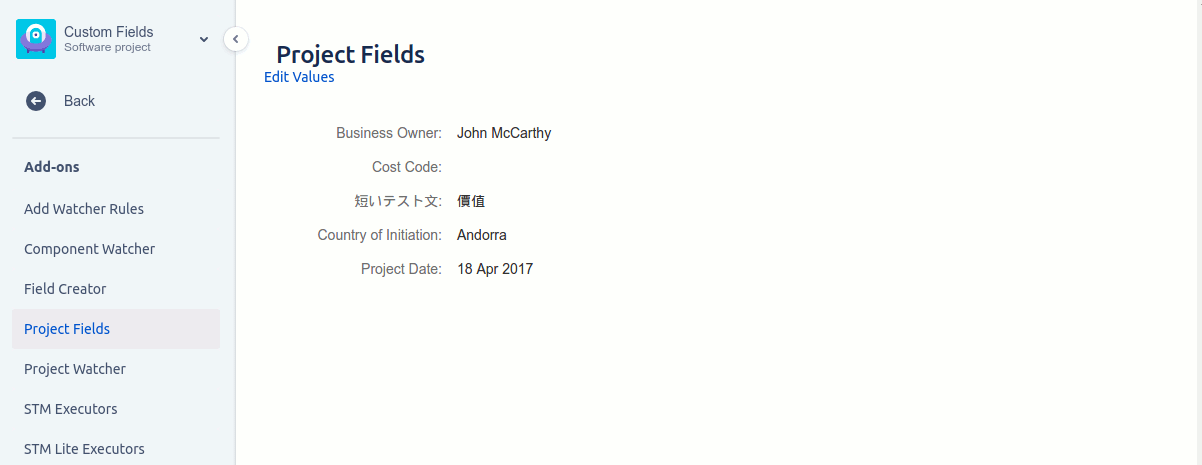
Why customers choose Custom Fields
- Project-level fields without involving a system admin. Project admins create fields scoped to their project. No central admin queue, no global namespace pollution.
- Per-field security. Sensitive data is restricted by group — no per-issue security setup needed. The same field can be invisible to most users and editable by a small group.
- Validators that are first-class objects. Define once, reuse on many fields. Disable centrally without un-assigning.
- JQL search where you need it. Opt-in mirroring lets a Custom Fields value behave exactly like a native field in the issue navigator without forcing the issue-only restriction on you.
- Cascading lists. The list-from-project type is unique — no native field offers it, and it’s the cleanest way to model regional / product / customer-segment narrowing.
- No code required. Project admins configure fields through the UI; no Groovy or scripting.
How Custom Fields compares
| Capability | Custom Fields | Native Jira custom fields | ScriptRunner Behaviours |
|---|---|---|---|
| Project-level fields (scoped to one project) | ✓ | ✗ | Partial |
| Issue-level fields | ✓ | ✓ | ✓ |
| Per-field security (Visible To / Editable By) | ✓ | ✗ (issue-level only) | Code only |
| Reusable validators (regex, min/max, on/off) | ✓ | Partial | Code only |
| List-from-project cascade type | ✓ | ✗ | Code only |
| JQL search via mirrored native field | ✓ | n/a | n/a |
| Project-admin managed (no system-admin needed) | ✓ | ✗ | ✗ |
| No code required | ✓ | ✓ | ✗ (Groovy) |
Rule of thumb. Native Jira custom fields are enough for issue-level fields that everyone can see. As soon as you need project-level fields, per-field security, validators, or a cascading list type, Custom Fields is the tool.
Free trial and pricing
Custom Fields has a free trial on the Atlassian Marketplace. Pricing is set by Atlassian and tiers by Jira user count — see the live tier table on the Marketplace listing.
Security and where your data lives
Custom Fields for Jira Cloud is a Forge app. Today it runs a Forge frontend with a Redmoon-controlled backend over HTTPS + OAuth, with a planned migration to fully Forge-native storage and processing. Full details are in the Cloud Security Statement.
See also
- In-depth user guide — Custom Fields user guide
- Reviews — Custom Fields Reviews
- Marketplace listing — Custom Fields on the Atlassian Marketplace
Book a demo
Want a walkthrough of Custom Fields tailored to your team’s data model? Get in touch via the Contact Us page and we’ll set up a live demo.