


















Comment History allows you to track every change and deletion of comments in Jira. Jira itself only keeps the last edit of a comment — Comment History keeps them all, including the contents of deleted comments, so you have a complete audit trail per issue.
Data Storage: All data is stored within Jira. No information is stored on Redmoon Software servers.
How do I view the edit history of a Jira comment?
Track all changes and deletions of comments in Jira
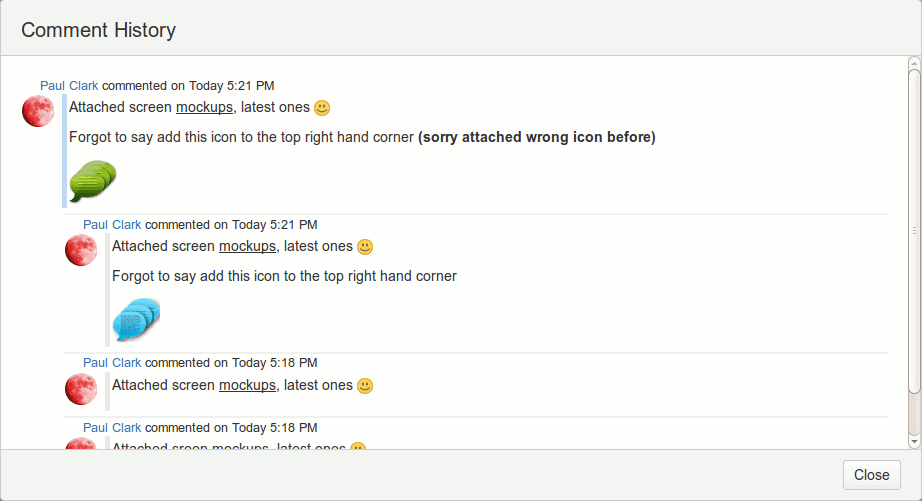
Open the issue’s Comment tab and click the clock-with-arrow icon next to any comment. Comment History for Jira shows a popup with every previous version of that comment alongside the author’s name and timestamp, including any versions that were later deleted. No re-index is required.
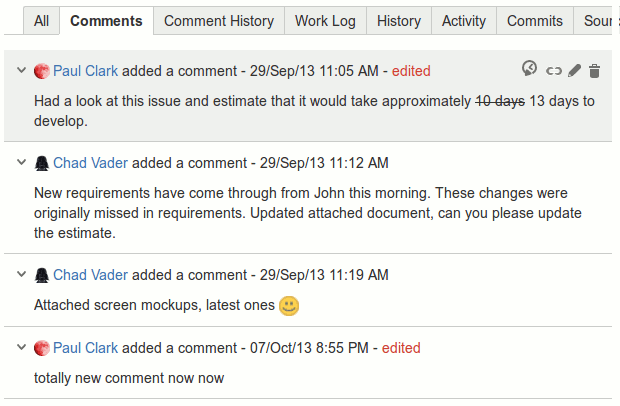
History of Comment
The history of the comment is shown in a popup, as below.
How do I see every change and deletion across all comments on a Jira issue?
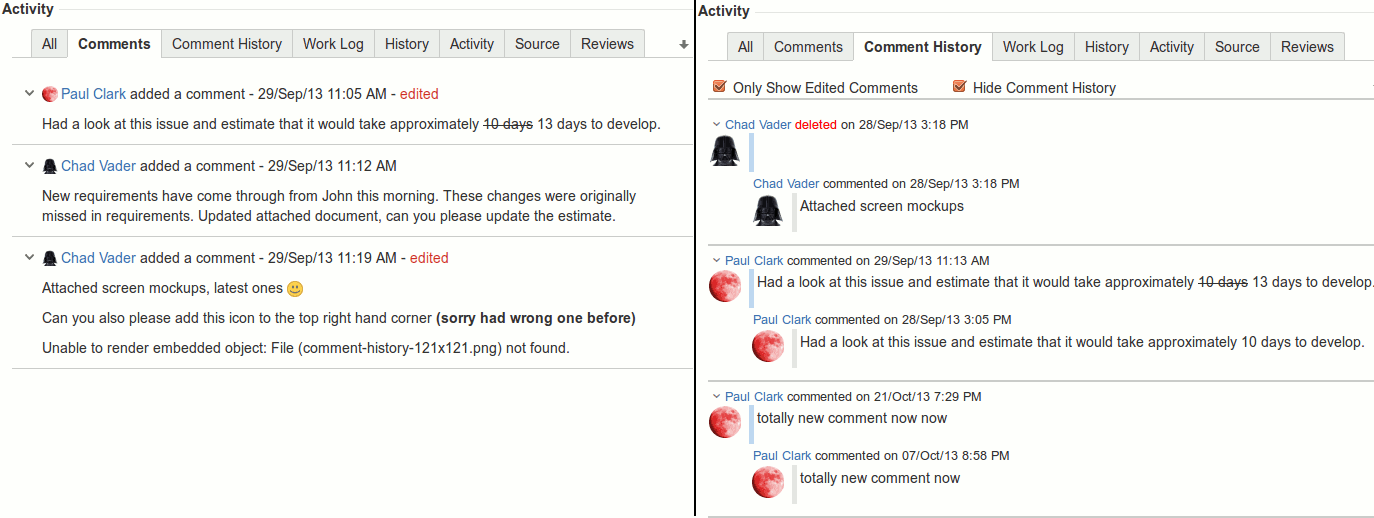
Each Jira issue gains a Comment History tab in its Activity section. The tab lists every current comment together with its full edit and deletion history, grouped chronologically per comment. The right-hand arrow toggles between newest-first and oldest-first ordering for the entire issue’s comment trail.
The image below shows an example Comment tab and the corresponding Comment History tab.
Filtering
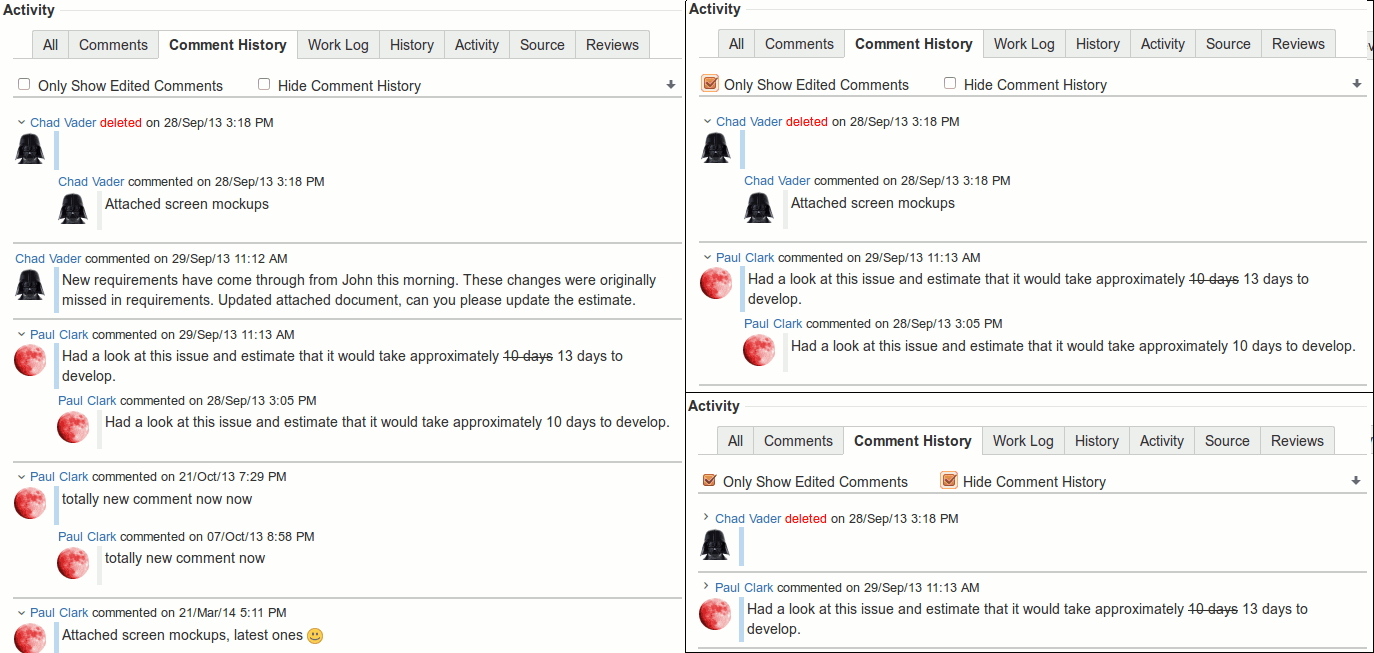
The Comment History comments can be filtered by one or both of:
Only Show Edited Comments: This hides all current comments that appear in the Comment tab but do not have any history.
Hide Comment History: This collapses all comments with history so that only the current comment is shown. For each collapsed comment the current comment can be clicked on to expand/collapse the comment and its history.
Clicking on the current comment, for any comment with a history, will either expand or collapse the history. An example of the different filters are shown below.
Who can view comment history in Jira?
Comment History respects Jira’s existing comment visibility rules. The plugin records the privilege level at the moment each comment is created, updated, or deleted, and only shows history entries to users who would have been allowed to see the underlying comment. Restricted comments stay restricted in the history view.
How do I show the most recent Jira comment on the issue panel?
Enable Show Last Comment on the Comment History admin screen. The latest comment then appears in the issue’s detail section. Two custom fields, LastUpdatedComment and LastCreatedComment, are auto-created so you can search by recent comment text with JQL such as LastUpdatedComment ~ "Closed" (limited to the first 255 characters).
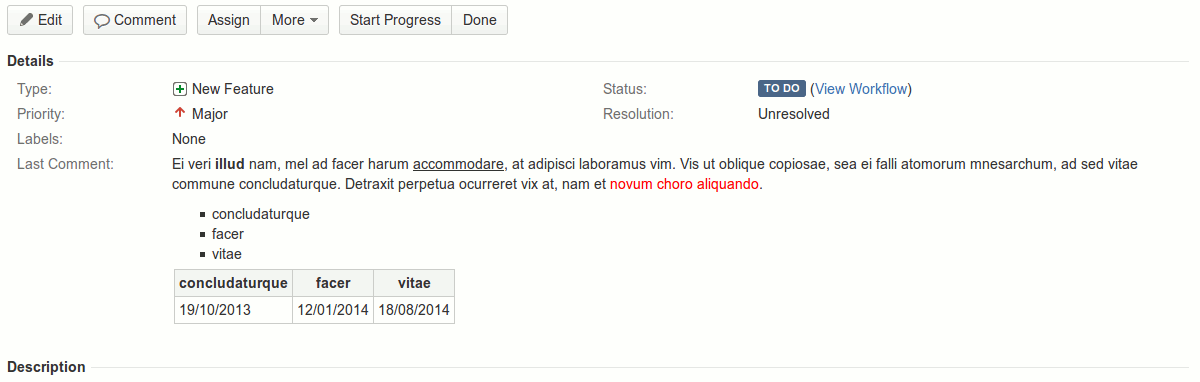
If alternate renderers (i.e. JEditor) are used for comments then these will be used to render the comment. Any restrictions applied are enforced for the comment display. For example if the user does not have permission to see the comment then the lozenge Access Denied will be shown.
The last comment can also be searched for in the Issue filtering screen using JQL. There are two fields that can be used when searching: LastUpdatedComment (the last comment that was either created or updated) and LastCreatedComment (the last comment that was created). Use the ~ operator for searching (i.e. LastUpdatedComment ~ "Closed"). This is limited to the first 255 characters of the comment.
NOTE: If values can’t be searched for a re-index may be required.
NOTE: When this feature is first used the LastUpdatedComment and LastCreatedComment fields will start to be populated with values. Searches will not be able to be used on old comments created/updated before this feature was used/added.
How do I configure Comment History for Jira?
Configuration lives under Jira admin → System → Comment History. You can set who sees the Comment History tab (admins only, everyone, or nobody), enable the Last Comment display, choose whether “last” means created or updated, and generate a REST API token. All settings are global and apply immediately.
History Tab
There are three different viewing permissions for the Comment History tab. These permissions are “To Admin users only”, “Always” and “Never”.
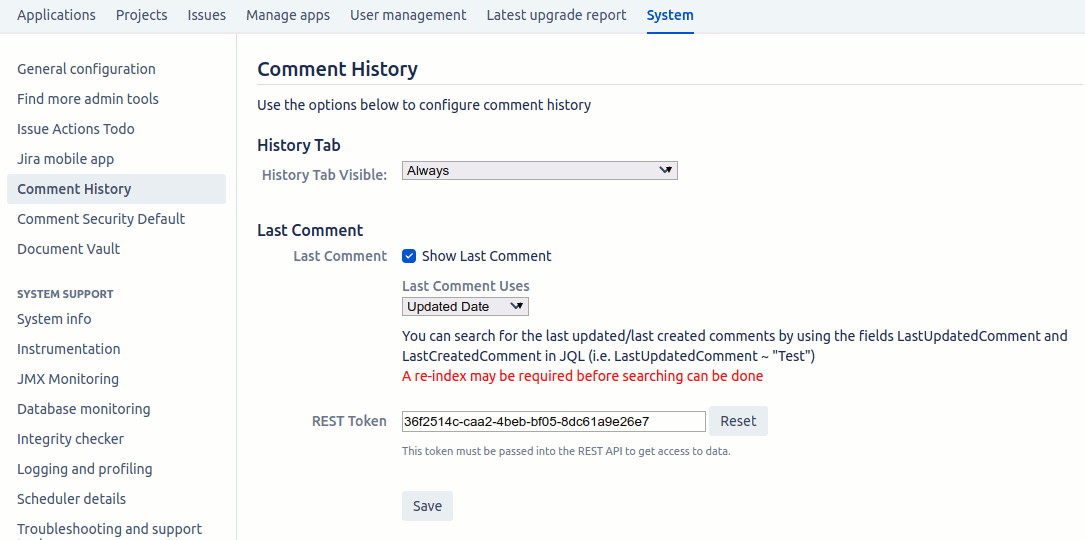
The “To Admin users only” means that only project admins will be able to see the Comment History tab. The “Always” option means that everyone will be able to see the tab, although individual viewing permissions still apply for each comment. The “Never” option hides the tab completely, useful when viewing history from the Comment tab is sufficient.
Last Comment
The Last Comment section allows you to specify if the Last Comment will be displayed (in the details area of an Issue) and what is classified as the last comment. The last comment will only be displayed if the “Show Last Comment” checkbox is checked.
If “Show Last Comment” is checked then you have the option of specifying if the last comment is defined as the last updated comment or the last created. For the last updated comment option, the creation of a new comment is classified as an update.
If the last comment is shown then two custom fields are automatically created (LastCreatedComment and LastUpdatedComment). These fields can then be used for searching for an Issue using JQL in the Issue filter screen. The custom fields are limited to 255 characters so only the first 255 characters are in these fields.
NOTE: If values can’t be searched for a re-index may be required.
NOTE: When this feature is first used the LastUpdatedComment and LastCreatedComment fields will start to be populated with values. Searches will not be able to be used on old comments created/updated before this feature was used/added. The comment is only added to these fields if the comment is viewable to all users (secure comments are not searchable).
REST Token
The REST Token is used for accessing the REST API. This token tells the REST API that you are authorised to access it.
REST API
Comment History offers a REST API for retrieving comments and their history for an Issue. There is a single endpoint with the following details:
Example URL: http://myWebSite.com/rest/commenthistory/1.0/history?issueKey=TEST-1&userKey=admin&token=36f2514c-caa2-4beb-bf058dc61a9e26e7
Method: GET
Parameters:
- issueKey — The key for the issue (mandatory)
- userKey — The key of the user that will look at the comments (mandatory)
- token — The REST API token from the configuration page
Return Type: JSON
HTTP Status: 200 for success and 400 for invalid parameters
The user key is used to identify which comments are returned if there is any security level set for a comment. An example of the returned data is shown below.
body: The text of the comment
updateAuthorKey: The user key for the author
updatedDate: The text (in Jira format) for when the comment was updated
updated: The long value of the updated date
commentId: The Jira comment Id
deleted: If this comment is deleted. Only true when comment has no history
updatedAuthorUrl: The URL for the author’s icon
history: A JSON array of objects containing the comment’s history. Same objects as this
id: The comment history id for the history. Not on the top-level object
Examples
A comment with history:
[
  {
    "history": [
      {
        "body": "Comment one, two",
        "updateAuthorName": "Paul Clark",
        "updateAuthorKey": "admin",
        "updatedDate": "Today 5:10 AM",
        "updated": 1505365825183,
        "commentId": 10102,
        "id": 9,
        "deleted": false
      },
      {
        "body": "Comment one",
        "updateAuthorName": "Paul Clark",
        "updateAuthorKey": "admin",
        "updatedDate": "Today 5:10 AM",
        "updated": 1505365817481,
        "commentId": 10102,
        "id": 8,
        "deleted": false
      }
    ],
    "body": "Comment one, two, three",
    "updateAuthorName": "Paul Clark",
    "updateAuthorKey": "admin",
    "updatedDate": "Today 5:10 AM",
    "updated": 1505365832381,
    "commentId": 10102,
    "deleted": false
  }
]
A comment without history:
[
  {
    "body": "My first comment",
    "updateAuthorName": "Paul Clark",
    "updateAuthorKey": "admin",
    "updatedDate": "Today 5:10 AM",
    "updated": 1505365809226,
    "commentId": 10101,
    "deleted": false
  }
]
A deleted comment with history:
[
  {
    "history": [
      {
        "updateAuthorName": "Paul Clark",
        "updateAuthorKey": "admin",
        "updatedDate": "Today 5:11 AM",
        "updated": 1505365861886,
        "commentId": 10103,
        "id": 11,
        "deleted": true
      },
      {
        "body": "No history",
        "updateAuthorName": "Paul Clark",
        "updateAuthorKey": "admin",
        "updatedDate": "Today 5:10 AM",
        "updated": 1505365847143,
        "commentId": 10103,
        "id": 10,
        "deleted": false
      }
    ]
  }
]
A deleted comment with no history:
[
  {
    "body": "My first comment",
    "updateAuthorName": "Paul Clark",
    "updateAuthorKey": "admin",
    "updatedDate": "Today 5:10 AM",
    "updated": 1505365809226,
    "commentId": 10101,
    "deleted": true
  }
]